Custody, lifecycle and audit
Asset Management System
Most organisations track equipment across spreadsheets, registers and knowledge held by individual people. As asset counts grow across departments, studios and locations, that produces gaps in accountability, slow physical verification and incomplete history. This platform replaces fragmented records with a structured digital workflow, supported by barcode labelling and handheld scanning.
- Delivery
- Scoped per estate size; includes onsite implementation and training
- Platform modules
- 11 modules on one data model
- Operated by
- Webworx Asia, under a managed model
The situation
What this exists to fix
- No single source of truth: the same asset appears in three registers with three different statuses.
- Nobody can say with certainty who currently holds a given item, or who held it last.
- Physical verification takes days because there is no way to scan and reconcile against a master list.
- Warranty and AMC dates are discovered after they expire.
- Service history lives in email threads, so recurring faults are never spotted.
- Audits require reconstructing history from memory rather than from a log.
The platform
11 modules, one data model.
Each module is purpose-built, and all of them share one record, one user directory and one audit trail.
01
Asset registration and master database
Every asset gets a system-generated unique ID and a complete record: name, category, sub-category, brand, model, serial number, purchase date and value, vendor, warranty, condition, status, location, department, assigned employee, photographs, documents and remarks.
02
Allocation and assignment
Assign assets to employees, departments, locations, offices, facilities and production units. Assigned, transferred, returned and reassigned are each time-stamped, building a complete custody chain.
03
Barcode and label management
Automatic asset code generation with print-ready labels carrying asset ID, name, serial number and company identification. Bulk printing and reprinting supported on a recommended thermal label printer.
04
Scanning workflow
Handheld barcode scanning for check-out, check-in, transfer, verification and physical audit, so counting a room is a walk-through rather than a project.
05
Lifecycle management
Procurement through to disposal with condition monitoring and full history retained against the asset record.
06
Maintenance and service management
Service tickets, maintenance scheduling, warranty and AMC tracking, with history per asset so repeat failures become visible.
07
Dashboard and analytics
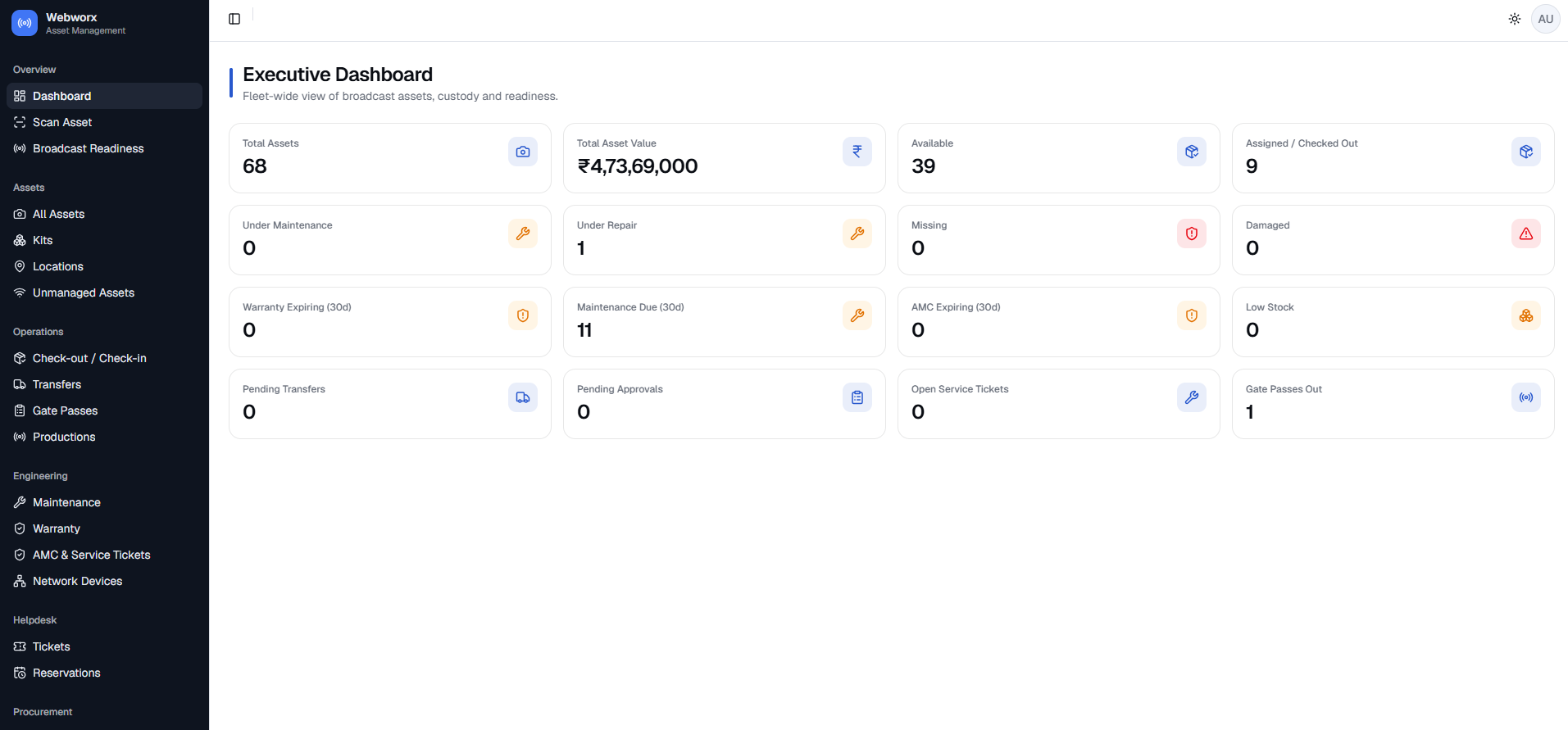
Fleet-wide view of total assets and value, availability, assignments, items under maintenance or repair, missing and damaged units, expiring warranties and AMCs, pending transfers and approvals, and low stock.
08
Reporting
Management reporting across the estate, exportable for finance, insurance and audit.
09
Roles and access control
Role-based permissions so administrators, department heads and operators each see and change only what they should.
10
Audit trail
Every create, change, assignment and approval recorded against a user and a timestamp — the record an auditor actually asks for.
11
Notifications and alerts
Alerts for expiring warranties and AMCs, overdue returns, pending approvals and open service tickets.
What you receive
Deliverables
- Cloud-deployed asset management platform
- Asset master with photographs and supporting documents
- Barcode and QR label generation with print-ready templates
- Handheld scanner workflows for check-out, check-in, transfer and audit
- Maintenance, warranty and AMC tracking
- Management dashboard and exportable reports
- Role-based access control and full audit trail
- Onsite implementation and user training
- Barcode printer and scanner recommendations with setup support
What changes
Outcomes
- A single source of truth for every organisational asset
- Clear accountability — who holds what, and who held it before
- Physical verification in hours rather than days
- Warranty and AMC dates surfaced before they lapse
- Audit-ready history without reconstructing it from memory
- Fewer asset-related operational gaps across departments and locations
How it is delivered
Scoped per estate size; includes onsite implementation and training
The plan we quote, with the gates where you sign off before the next stage starts.
01
Discovery and data model
Asset categories, custody model, locations, departments and approval rules.
02
Configuration and build
Asset master, workflows, label templates, roles and reporting.
03
Labelling and onboarding
Bulk label generation, physical tagging and opening-balance import.
04
Onsite implementation and training
Scanner setup, printer setup and hands-on training for the teams who will run it.
Integrate, don't rebuild
Built on services that already work
We build and own the application, the workflows and the operations. For infrastructure we integrate proven managed services rather than untested in-house equivalents — lower deployment risk, faster launch, and infrastructure billed at real usage.
- Thermal label printers
- Handheld barcode scanners
- Secure cloud hosting
Questions
Asked before every engagement
No. An inventory list tells you what you own. This tells you who has it, who had it before, what condition it is in, what has been repaired, what is under warranty, what is due back, and who approved each of those changes. The audit trail is the part that separates the two.
A thermal label printer and handheld barcode scanners. We recommend specific widely available models, and both are covered in the implementation and training scope. Hardware is quoted separately at cost so you are free to procure it yourself.
Yes. Assets are assigned to locations, offices, facilities and production units as well as to people and departments, and transfers between them are tracked as part of the custody chain.
Yes — we run this platform ourselves at assets.webworxasia.com. You can see the real product rather than a slide deck.
Capabilities behind it
Services this draws on
More platforms
Other solutions
Unified content and video
OTT & Video Streaming Platform
End-to-end OTT: ingest, transcoding, live, VOD, DRM, CDN delivery, subscriptions, pay-per-view and advertising on one governed platform.
Field data to decisions
MIS Dashboard & Field Inspection App
Centralised management information system with Android and iOS apps for field data capture, real-time insights and large-scale inspection programmes.
Storefront, CRM and automation
Premium Website & AI Commerce Suite
Premium brand site through to a full commerce platform — inventory, orders, GST invoicing, CRM, marketing automation and AI assistants.
Investigation and evidence
Cyber Forensic Audit
Forensic investigation of suspected unauthorised access, insider activity and data exfiltration, with legally defensible documentation and a remediation roadmap.
Start with the problem, not the product
Tell us what is breaking. We will scope it honestly — including telling you when Asset Management System is more platform than you need.